iOS App
Hansard
See how they treat you.
Browse UK Parliament — Members of the Commons, House of Lords, and constituencies with an interactive map, running natively on your iPhone and iPad.
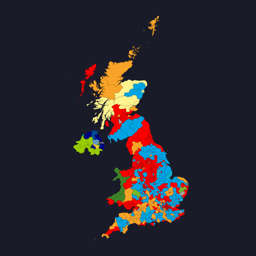
650 seats — map ↔ party share. Parties with fewer than 10 seats are grouped into a single wedge, each dot keeping its party colour.
Learn more
Hansard is a native iOS browser for the UK Parliament. Named after the official record of debates in the Commons and Lords, the app puts every MP, every Lord, and every constituency at your fingertips — with offline-first access to the data that matters.
Built as a tool for the curious citizen, the researcher, and anyone who wants to understand how parliament actually works.
Features
Members of the Commons
Browse and search every sitting MP. View party affiliation, constituency, contact details, and portrait — all from the official Parliament API.
House of Lords
Explore the full list of Lords, filtered by party or type. Life peers, hereditary peers, and bishops — all searchable and browsable.
Constituency Map
An interactive MapKit map with every UK constituency boundary drawn as a polygon overlay, coloured by the sitting member's political party.
Offline-First
Bundled JSON snapshots of constituency boundaries and member data. The app works immediately on first launch — no network required.
Voting History
View how members voted in parliamentary divisions. Filter by date, topic, or member to see voting records at a glance.
Written Questions
Browse parliamentary written questions and answers. Search by topic, member, or department to follow the detail of governance.
Engineering
The animation above renders 650 constituency dots that morph between a UK map and a party-share pie chart. Read how it's put together.